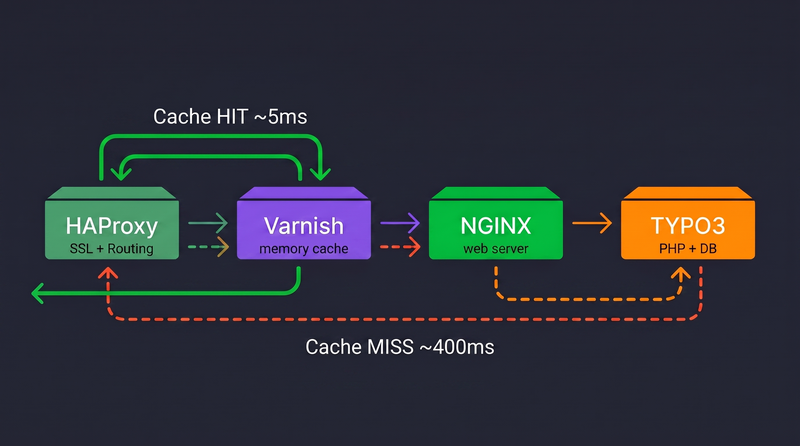
Dein TYPO3 läuft, dein Webserver ist konfiguriert, und deine Website ist online. Aber wenn der Traffic wächst, fängst du an, über Performance nachzudenken. Wirfst du einfach mehr Serverleistung darauf? Nein. Du baust einen ordentlichen Caching-Stack davor.
In diesem Beitrag gehe ich mit dir durch, wie du Load Balancer, Cache-Layer und Webserver zusammen mit TYPO3 in Produktion aufsetzt — anhand vereinfachter und sicherer Beispielkonfigurationen.
Die Architektur
Bevor wir uns eine Konfiguration ansehen, verstehen wir den kompletten Request-Ablauf:
Browser → Load Balancer → Cache-Layer → Webserver → PHP-FPM → TYPO3
Jede Schicht hat genau eine Aufgabe:
- Load Balancer — übernimmt die SSL-Terminierung und routet den Traffic
- Cache-Layer — cacht vollständige HTTP-Antworten im Arbeitsspeicher
- Webserver — wird nur bei einem Cache-Miss überhaupt angefasst
- TYPO3 — verarbeitet Requests nur, wenn es keine gecachte Antwort gibt
Das Ziel ist simpel: dafür sorgen, dass TYPO3 so wenig Arbeit wie möglich macht.
Load Balancer — die Eingangstür
Der Load Balancer sitzt ganz vorne im Stack. Er übernimmt die SSL-Terminierung und entscheidet — anhand von Hostname und Pfad —, wohin jeder Request geht. Nicht alles sollte gecacht werden. Das TYPO3-Backend muss den Cache immer umgehen.
frontend http-in
  bind *:80
  bind *:443 ssl crt /path/to/certs/

  http-request set-header X-Forwarded-Port %[dst_port]
  http-request add-header X-Forwarded-Proto https if { ssl_fc }

  acl site hdr_end(host) -i example.com
  acl admin_path path_beg -i /typo3

  use_backend backend_admin if site admin_path
  use_backend cache_layer if site

backend backend_admin
  server app_backend:80
  http-request auth unless { http_auth(admin-auth-list) }

backend app_backend
  server app_backend:80

backend cache_layer
  server cache_service:6081
Route den TYPO3-Admin-Pfad immer direkt ans Backend und lass ihn den Cache komplett umgehen.
Cache-Layer — die Konfiguration
Der Cache-Layer übernimmt das HTTP-Caching und sorgt dafür, dass wiederholte Requests TYPO3 nie erreichen.
vcl 4.1;

backend default {
    .host = "app_backend";
    .port = "80";
}

sub vcl_recv {
    if (req.method != "GET" && req.method != "HEAD") {
        return (pass);
    }

    if (req.http.Cookie ~ "fe_typo_user") {
        return (pass);
    }

    unset req.http.Cookie;

    return (hash);
}

sub vcl_backend_response {
    unset beresp.http.Set-Cookie;
    set beresp.ttl = 30d;

    return (deliver);
}

sub vcl_deliver {
    if (obj.hits > 0) {
        set resp.http.X-Cache = "HIT";
    } else {
        set resp.http.X-Cache = "MISS";
    }
}
Nur GET und HEAD werden gecacht. Alle anderen Requests gehen direkt an TYPO3.
Eingeloggte Nutzer umgehen den Cache. Das verhindert, dass personalisierte Inhalte gecacht und an andere Nutzer ausgeliefert werden.
Lange TTLs sind Absicht. Für frische Inhalte sorgt die Cache-Invalidierung, nicht eine kurze Cachezeit.
TYPO3 für den Reverse Proxy konfigurieren
Ergänze Folgendes in deiner Konfiguration:
$GLOBALS['TYPO3_CONF_VARS']['SYS']['reverseProxyIP'] = 'cache-layer-ip';
$GLOBALS['TYPO3_CONF_VARS']['SYS']['reverseProxyHeaderMultiValue'] = 'first';
$GLOBALS['TYPO3_CONF_VARS']['SYS']['trustedHostsPattern'] = '.*';
Damit löst TYPO3 Client-IPs und Protokoll-Header korrekt auf.
Cache-Invalidierung
Damit gecachte Inhalte frisch bleiben, nimm eine Extension, die bei Inhaltsänderungen eine Cache-Invalidierung auslöst:
composer require opsone-ch/varnish
Damit ist sichergestellt:
- Der Cache wird geleert, wenn Inhalte aktualisiert werden
- Frische Inhalte werden direkt nach einer Änderung ausgeliefert
- Lange Cache-Laufzeiten bleiben unproblematisch
Entscheide dich für eine Caching-Strategie
Kombiniere nicht mehrere Full-Page-Caching-Systeme.
- Lass nicht zwei Caching-Schichten parallel laufen
- Vermeide widersprüchliche Cache-Zustände
- Halte die Cache-Invalidierung simpel und vorhersehbar
Such dir eine Caching-Strategie aus und bleib dabei. Einfachheit ist der Schlüssel zu verlässlicher Performance.