You've got your TYPO3 running, your NGINX configured, and your website is live. But as traffic grows, you start thinking about performance. Do you just throw more server power at it? No. You build a proper caching stack in front of it.
In this post I'll walk you through exactly how I set up HAProxy, Varnish and NGINX together with TYPO3 in production — including the real configs I'm running right now. I'll also tell you why you should never combine Varnish with StaticFileCache. Yes, I mean never.
The Architecture
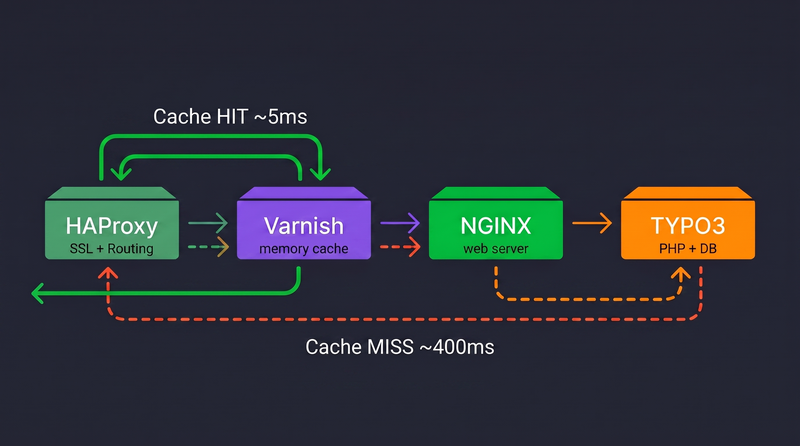
Before we look at any config, let's understand the full request flow:
Browser → HAProxy (SSL + Routing) → Varnish (Cache) → NGINX → PHP-FPM → TYPO3
Each layer has one job:
- HAProxy — handles SSL termination, routes traffic to the right backend based on hostname and path
- Varnish — caches full HTTP responses in memory, serves them without touching PHP
- NGINX — the actual web server, only gets hit on a cache miss
- TYPO3 — only wakes up when Varnish doesn't have a cached response
The goal is simple: make sure TYPO3 does as little work as possible. A page that took 400ms to generate by PHP should be served by Varnish in under 5ms on every subsequent request.
HAProxy — The Front Door
HAProxy sits at the very front of the stack. It handles SSL termination with Let's Encrypt certificates and decides — based on hostname and path — where each request goes. Not everything needs to go through Varnish. The TYPO3 backend, for example, should never be cached.
The key part of my HAProxy config for TYPO3 looks like this:
Two things are worth highlighting here. First, the /typo3 path gets its own backend with basic auth — it completely skips Varnish. There's no point caching TYPO3 backend requests, and you definitely don't want an editor's logged-in session leaking into a cached response. Second, HAProxy terminates SSL and adds the X-Forwarded-Proto header so TYPO3 knows the original request came in over HTTPS.
Always route your TYPO3 admin path directly to the backend, bypassing the cache entirely. Varnish has no business seeing backend traffic — and neither does anyone else, which is why basic auth on the admin route is a good idea.
Varnish — The Cache Layer
Varnish runs in a Docker container and listens on port 6081. HAProxy knows about it as a backend at 172.100.0.200:6081. Here's the full VCL config I'm running:
A few things to understand about this config:
Only GET and HEAD are cached. Any other method — POST, PUT, DELETE — passes straight through to TYPO3. This is correct behavior. You never want to cache form submissions or API writes.
The fe_typo_user cookie check is critical. When a visitor is logged into the TYPO3 frontend, their requests bypass Varnish entirely and go directly to TYPO3. Without this, a logged-in user's personalised page could end up in the cache and be served to everyone.
The 31-day TTL is aggressive — and intentional. Instead of relying on short TTLs to keep the cache fresh, we invalidate the cache explicitly when content changes. This is where the TYPO3 Varnish extension comes in.
The X-Cache: HIT and X-Cache: MISS headers in the response are your best debugging tool. Open your browser dev tools, check the response headers, and you'll immediately know whether Varnish served the page or PHP did.
The TYPO3 Varnish Extension
A 31-day TTL only works if you have a way to tell Varnish "this page has changed, throw away the cached version". That's exactly what the TYPO3 Varnish extension does.
Install it via Composer:
The extension hooks into TYPO3's cache management. Whenever an editor publishes a page, saves a content element, or triggers a cache flush in the backend, the extension automatically sends a PURGE or BAN request to Varnish. Varnish drops the stale cached entry, and the next visitor gets a fresh response from TYPO3 — which Varnish then caches again for the next 31 days.
You'll also need to tell TYPO3 about the reverse proxy setup so it correctly resolves visitor IPs and generates the right URLs. Add this to your AdditionalConfiguration.php:
The reverseProxyIP is your Varnish container's IP — the same one HAProxy routes to. Without this, TYPO3 thinks every visitor is coming from Varnish's IP address.
Do Not Use StaticFileCache — Choose One
If you've been using TYPO3 for a while, you'll know EXT:staticfilecache. It's a popular extension that generates static HTML files from your TYPO3 pages and stores them on disk. NGINX can then serve those files directly without touching PHP.
Sounds familiar? It should — because that's exactly what Varnish does. They solve the same problem in different ways. Using both at the same time creates a mess:
- You now have two separate cache layers, both needing to be invalidated when content changes
- StaticFileCache writes HTML files to disk — which Varnish then caches in memory. You're caching a cache
- When a page looks stale, you won't know which layer is serving it — Varnish or the static file
- Cache invalidation logic needs to work for both systems simultaneously — and it won't
Combining Varnish and StaticFileCache is like having two GPS systems in your car giving you different directions at the same time. Pick one and follow it. I pick Varnish — it's faster, more flexible, and doesn't write anything to disk.
StaticFileCache makes sense if you have a simple single-server setup and no need for a separate caching layer. Varnish makes sense when you need serious performance, multiple backends, or a proper separation of concerns — like this stack. Just don't run both.
Bye Bye
Well that's it from my side for today.
Have a good one!