Das hat mich fast in den Wahnsinn getrieben! Wirklich. Ich habe alles überprüft, jede Extension, jede Konfiguration – und trotzdem bekam ich die falschen Bilder ausgeliefert, weil ich dieses winzige Detail übersehen hatte!
Bilder sind in der Regel die schwersten Elemente auf einer Webseite. Ein einziges Foto kann größer sein als der gesamte Code der Seite zusammen.
WebP ist ein neueres Bildformat von Google, das Bilder kleiner macht – manchmal um 30 % – ohne dass das menschliche Auge einen Unterschied erkennt. Kleinere Bilder bedeuten schnellere Seiten. Schnellere Seiten bedeuten zufriedenere Besucher.
In diesem Beitrag zeige ich, wie ich TYPO3 so eingerichtet habe, dass es automatisch WebP-Bilder an Browser ausliefert, die das Format unterstützen – ohne ein einziges Template oder HTML anzufassen.
Das Problem, wenn man einfach eine WebP-Datei hochlädt
Die naheliegende Lösung klingt simpel: einfach WebP-Dateien statt PNG oder JPG hochladen. Aber so sauber funktioniert das nicht. TYPO3 speichert Bildreferenzen in der Datenbank über den Dateinamen. Ändert man die Datei, bricht die Referenz. Und ältere Browser unterstützen WebP nach wie vor nicht – sie zeigen stattdessen ein kaputtes Bild an (heutzutage sollte das kein Problem mehr sein, aber man weiß ja nie).
Was wir eigentlich wollen: Das PNG oder JPG bleibt die "Source of Truth", aber Browser, die schlau genug sind, bekommen WebP ausgeliefert. Still und leise. Automatisch.
Die beste Performance-Optimierung ist die, die deine Nutzer nie bemerken. Sie erleben einfach nur eine schnellere Website.
Schritt 1 – TYPO3 die WebP-Dateien erzeugen lassen
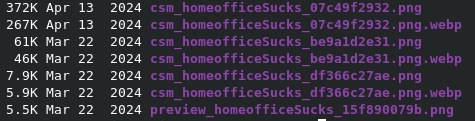
Die Extension plan2net/webp klinkt sich in die Bildverarbeitungs-Pipeline von TYPO3 ein. Jedes Mal, wenn TYPO3 ein Bild skaliert oder zuschneidet, jagt die Extension das Ergebnis durch GraphicsMagick und legt eine .webp-Kopie direkt neben der ursprünglich verarbeiteten Datei ab.
Wenn TYPO3 also diese verarbeitete Datei erzeugt:
csm_Typo3dockergitlab_6ce5166ccb.png
legt die Extension automatisch diese Datei daneben an:
csm_Typo3dockergitlab_6ce5166ccb.png.webp
Das kannst du selbst auf dem Server überprüfen:
find ~/pages/typo3blogs/data/fileadmin/_processed_ -name "*.webp" | head -10
Wenn du .webp-Dateien neben den .png-Dateien liegen siehst – ist der erste Schritt erledigt.
Schritt 2 – Apache beibringen, WebP automatisch auszuliefern
Die WebP-Dateien liegen jetzt auf der Platte. Aber Apache weiß noch nicht, dass er sie benutzen soll. Im HTML steht weiterhin src="image.png", und Apache liefert brav das PNG aus.
Das beheben wir mit einer einfachen Rewrite-Regel in der Apache-VirtualHost-Konfiguration. Sie besagt: Wenn der Browser WebP unterstützt und eine .webp-Version der angeforderten Datei existiert, liefere stattdessen diese aus.
AddType image/webp .webp


    RewriteEngine On
    RewriteCond %{HTTP_ACCEPT} image/webp
    RewriteCond %{REQUEST_FILENAME}.webp -f
    RewriteRule ^(.+\.(jpe?g|png))$ $1.webp [T=image/webp,E=ACCEPT_WEBP:1,L]


    Header append Vary Accept env=ACCEPT_WEBP
Schauen wir uns das Zeile für Zeile an:
- RewriteCond %{HTTP_ACCEPT} image/webp – nur umschreiben, wenn der Browser mitgeteilt hat, dass er WebP verarbeiten kann
- RewriteCond %{REQUEST_FILENAME}.webp -f – nur umschreiben, wenn tatsächlich eine
.webp-Datei auf der Platte existiert - RewriteRule ... – die
.webp-Datei ausliefern und dem Browser mitteilen, dass der Content-Typeimage/webpist - Header append Vary Accept – Caches anweisen, die PNG- und die WebP-Version getrennt zu speichern
Das HTML ändert sich nie. Im Bild-src steht weiterhin .png. Der Browser fragt nach einem PNG – Apache reicht ihm stillschweigend ein WebP. Das war's.
Warum der Vary-Header wichtig ist
Ohne den Vary: Accept-Header könnte eine Caching-Schicht wie Varnish die WebP-Version cachen und sie dann an einen Browser ausliefern, der WebP nicht unterstützt – und schon ist das Bild kaputt. Der Vary-Header sagt jedem Cache in der Kette: "Diese Antwort hängt davon ab, was der Browser als akzeptiert gemeldet hat, also speichere die Varianten getrennt."
Wie du prüfst, ob es funktioniert
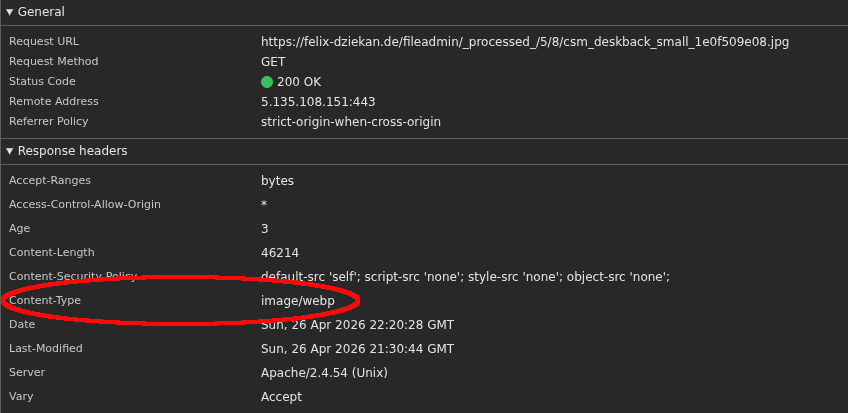
Und genau dieser Teil hat mich in den Wahnsinn getrieben! Man sieht weder auf der Website noch im HTML-Code irgendeine Veränderung. Dort ist immer noch die ursprüngliche .png-/.jpeg-/.wasauchimmer-Datei referenziert.
Du musst stattdessen den Content-Type prüfen, der tatsächlich ausgeliefert wurde.
curl -sI -H "Accept: image/webp,*/*" felix-dziekan.de | grep -i "content-type\|vary"
Du solltest Folgendes sehen:
content-type: image/webp
vary: Accept
Oder öffne die DevTools deines Browsers, gehe auf den Netzwerk-Tab, lade die Seite neu und klicke auf ein beliebiges Bild. Der Content-Type sollte image/webp anzeigen, obwohl im src des HTML weiterhin .png steht.
Das Ergebnis
Jeder Besucher mit einem modernen Browser – also praktisch alle – bekommt jetzt automatisch WebP-Bilder. Keine Template-Änderungen. Keine Datenbank-Änderungen. Keine kaputten Bilder für Nutzer mit einem alten Browser. Die PNG-Dateien bleiben genau da, wo sie sind – als Fallback.
Zwei Konfigurationsdateien, eine Handvoll Zeilen, und deine Bilder sind messbar schneller.